AURA v0.6.4 · Latest release

Every download.
Under control.

One clear place for your files, transfers and queues. AURA brings browser downloads into a fast desktop manager—without cluttering your workflow.

Linux & Windows Chrome & Firefox Local-first
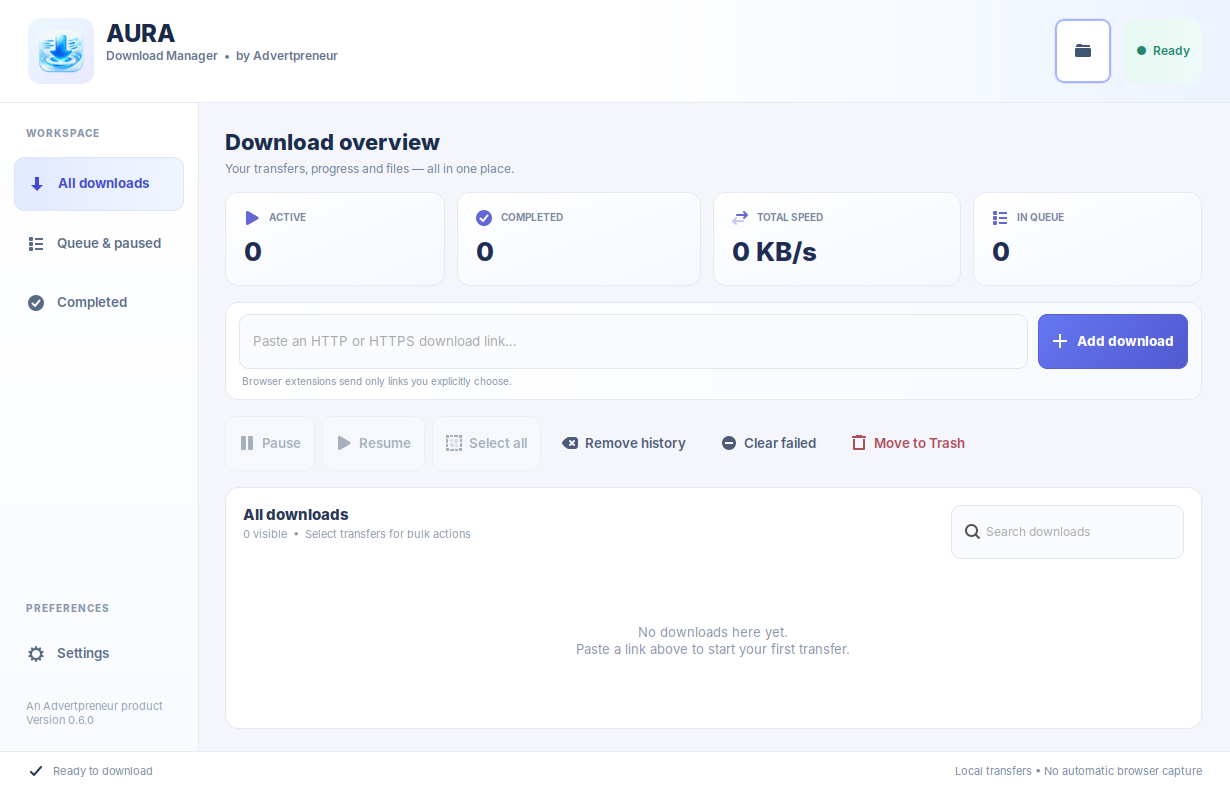
AURA Linux desktop showing the download overview, speed status, transfer controls and file list
Real Linux desktop capture · v0.6 interface family Native app
Automatic browser handoff Pause & resume Managed queues No pairing codes

Everything a download manager should be. Nothing it shouldn't.

Designed to keep transfers easy to start, easy to find and easy to manage, whether you're downloading one file or a whole queue.

BROWSER INTEGRATION

It catches the downloads.
You stay focused.

Supported Chrome and Firefox downloads hand off automatically when AURA is running. Images and common webpage assets stay in the browser, while the right-click option lets you send any supported image or link yourself.
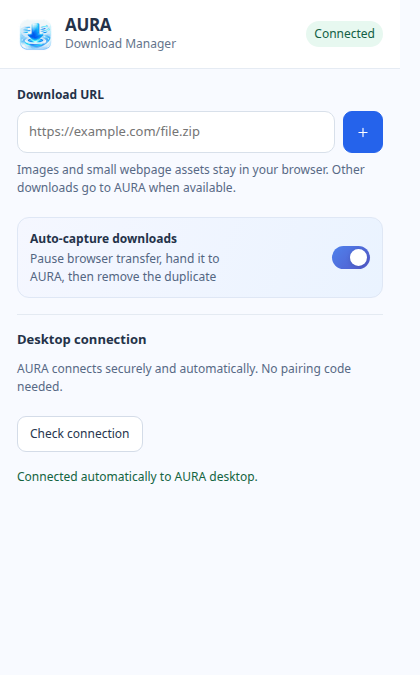
AURA extension popup with automatic capture enabled and desktop connected
TRANSFER CONTROL

More speed. More say.

Built on aria2 for parallel connections, pause and resume, and configurable simultaneous downloads. Actual speeds depend on your connection and the file server.

CLEAR ORGANIZATION

All the detail. None of the mess.

Find past downloads, see queue progress, change preferences in compact Settings and choose exactly when files should be removed.

Your browser and desktop, finally in sync.

Native messaging connects the AURA extension to its local desktop helper—no pairing code to copy, and no private desktop credential shared with the extension.

Install the desktop app and extension

Use Chrome's unpacked extension or Firefox's temporary add-on for testing. Registration is handled locally.

Capture downloads automatically

AURA receives eligible HTTP(S) downloads. Keep the toggle off if you'd rather handle files manually.

Keep images in your browser

Common image types and small webpage assets are excluded. Right-click an image and choose Download with AURA when you want it.

AURA browser extension showing Auto-capture enabled and connected status
Isolated extension preview with a simulated connected state

Made for your desktop.
Ready when you are.

Get the verified GitHub release packages. The Linux UI has been tested locally; the Windows build passes automated startup checks.

Linux Mint / Ubuntu / Debian

Download for Linux

Native GTK application. Includes desktop launcher, the AURA icon and local browser connection setup.

Get Linux archive
Windows 10 / 11 · 64-bit

Download for Windows

Native Qt desktop application packaged with the download engine and browser helper. Unsigned ZIP.

Get Windows ZIP

Version 0.6.4 · Latest releases · Checksums & release notes

Set up in a few steps.

Everything is handled locally and stored on your machine. You stay in control of when downloads start and when updates are installed.

Installation guide
  1. Download the packagePick the Linux archive or Windows ZIP above. Extract the files to a location you'll keep.
  2. Start AURAOn Linux, install the required GTK dependencies and run bash scripts/install-linux.sh. On Windows, open AURA-Download-Manager.exe from the extracted folder.
  3. Add the browser extensionUse Chrome's Load unpacked option or Firefox's temporary add-on. AURA connects through a locally registered helper; no pairing code needed.

Good to know.

Will AURA capture every browser download?

No. When enabled, auto-capture handles eligible HTTP(S) downloads. Images, common webpage assets, private browsing downloads and unsupported links stay in the browser. Files needing cookies or login state may also require the browser.

Can I download images with AURA?

Yes. Images are excluded from automatic capture, but you can right-click an image or image link and use Download with AURA.

Does AURA install updates automatically?

No. It checks official GitHub Releases and lets you decide whether to install a newer version.

Is AURA open source?

The repository is public and its source can be viewed. It currently has no general open-source license. The underlying aria2 engine is a separate GPL-licensed project.